MITRE ATT&CK Navigator
ATT&CK Navigator displays ATT&CK matrices and lets you annotate techniques with colours, scores, and comments. Use it to document an assessment, compare adversary behaviour, or plan an exercise. A coloured technique represents your assessment; Navigator does not verify detection coverage.
A key feature is customisable "layers," allowing users to focus on specific platforms, highlight adversary techniques, or filter data. Layers can be created interactively or generated programmatically for later use.
What Navigator does
Navigator turns an ATT&CK matrix into a purpose-specific layer. A layer can select techniques, assign colours or scores, record comments, compare assessments, and export the result for review. The visual is useful only when its purpose and scoring rules are documented.
Choose your journey
You do not need to complete every section. Choose the journey that matches your goal and available environment.
Start with the purpose, not the colour
Decide whether a layer represents observed behaviour, visibility, detection, validation, adversary intelligence, or a plan. Record what each score and colour means before selecting techniques.
Lab Setup for Proof of Concept
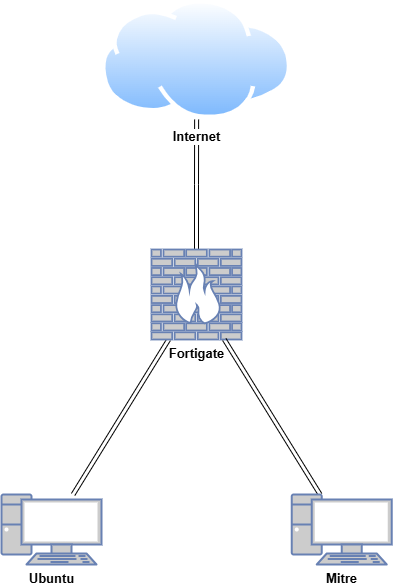
In this proof of concept, MITRE ATT&CK Navigator was installed and configured in an air-gapped Ubuntu environment. Layers were created using the Tactics, Techniques, and Procedures (TTPs) of well-known Advanced Persistent Threats (APTs). These layers were rendered in different colours and combined to demonstrate how MITRE ATT&CK Navigator can be used for both red team and blue team planning.
| Host | OS | Role | IP Address |
|---|---|---|---|
| Fortigate | Fortios 7.6.0 | Firewall/Router | 192.168.1.10 (WAN) / 10.0.0.1 (LAN) |
| Ubuntu | Ubuntu 24.04 | Internet-Connected VM | 10.0.0.200 |
| Mitre | Ubuntu 24.04 | Air-gapped VM | 10.0.0.150 |
Official resources
- Use the MITRE ATT&CK knowledge base when checking technique definitions and relationships.
- Use the ATT&CK Navigator repository for source code, releases, and deployment guidance.
- Watch the preserved Navigator demonstration and layer workflow video for additional examples.